
Building a Cloud-Native PKI with HashiCorp Vault
I built an HA Vault PKI on Kubernetes to sign the subordinate CA that Global Secure Access needs for TLS inspection. Vault cannot issue a certificate that is both a CA and carries Server Auth EKU, so it could not be done. Updated September 2026: Microsoft now offers a managed certificate for GSA in preview, which removes the problem entirely.
So here is a problem that sounds straightforward until you actually try to solve it: Microsoft Global Secure Access (GSA) needs a subordinate CA certificate to do TLS inspection, and getting that certificate signed turns out to be a rabbit hole that goes surprisingly deep.
It ends with Vault losing. I will not make you read eleven minutes to find that out: GSA needs a certificate that is both a CA and carries a Server Auth extended key usage, and Vault cannot issue one. Its role endpoint will give you the EKU but not the CA bit; its intermediate endpoints will give you the CA bit but have no ext_key_usage parameter at all. Not in the Terraform provider, and not in the API underneath it.
I finished the build anyway. Partly because by that point I wanted to know whether the rest of it would work (it does) and partly because the interesting part of this was never the GSA certificate. It was a production-grade, HA HashiCorp Vault PKI on Kubernetes, with Azure Key Vault auto-unseal, Entra ID OIDC authentication and a two-tier CA hierarchy, deployed entirely as code with no clicking around in portals.
So: the full build, then the blocker, then what I used instead. If you only came for the blocker fix, jump to signing the GSA CSR.
Update, September 2026
Microsoft has since added a managed certificate option for GSA TLS inspection, currently in preview. Microsoft generates and operates a tenant-specific root CA for you, so the entire bring-your-own-CA problem this post is about simply does not arise. If you are starting today, read the update at the end first, then decide whether you still need any of this.
The Problem
GSA TLS inspection works by acting as a man-in-the-middle for HTTPS traffic. To do this, it needs a subordinate CA certificate - specifically one with:
basicConstraints: critical, CA:TRUE, pathlen:1
keyUsage: critical, keyCertSign, cRLSign
extendedKeyUsage: serverAuth
The CA:TRUE constraint is the key detail here. It means this certificate cannot be issued by a publicly trusted CA - Let's Encrypt, for example, will flat out refuse it. cert-manager will also refuse to even submit a CSR with IsCA: true to Let's Encrypt.
See this link for more details on the actual challenge I was facing.
So you need your own CA. And if you are going to run your own CA, you might as well do it properly.
Why Not Let's Encrypt?
Let's Encrypt only issues end-entity certificates. There is no workaround, no special flag, no exception process. This is by design - a publicly trusted CA issuing subordinate CA certificates to arbitrary customers would be a significant security problem.
If you are running cert-manager and try to submit a CSR with IsCA: true, you will get:
admission webhook "webhook.cert-manager.io" denied the request:
spec.request: Invalid value: "...": encoded CSR error:
IsCA true does not match expected value false
cert-manager catches this before it even reaches Let's Encrypt. So that removes Let's Encrypt as an option. Still love cert-manager though!
Why Not EZCA or Azure Key Vault?
I had a look at EZCA (from Keytos) first. It is a managed CA service that integrates nicely with Azure and Entra ID. The problem is that it does not support the full set of extensions that GSA TLS inspection requires - specifically the pathLenConstraint and the combination of basicConstraints=critical,CA:TRUE with the required key usages. Another dead end.
Azure Key Vault's managed CA integration (via DigiCert or GlobalSign) has the same problem. You do not get full control over the certificate profile, and subordinate CA issuance with custom constraints is not supported.
ADCS would work, but it introduces a significant dependency on Windows infrastructure that I would rather not have. Adding AD services feels... like something from the previous decade. VM's to manage, managing services that are complex for even hardened veterans, and the lack of proper automation - no thanks.
Why HashiCorp Vault?
Vault looked like it gave complete control over certificate profiles. The pki/root/sign-intermediate endpoint lets you specify what goes into the signed certificate - max_path_length, key usages, basic constraints - with no managed-service limitations in the way.
That turned out to be true for everything except the one extension I needed. Hold that thought.
It also runs perfectly well on Kubernetes, has a solid Terraform provider, integrates with Entra ID via OIDC, and supports Azure Key Vault for auto-unseal. The operational model fits well into a Kubernetes-native stack - which in my case means ArgoCD and cert-manager already running.
Plus, I've always wanted to use Vault but never had the right use case for it.
Architecture
Here is what we are building:
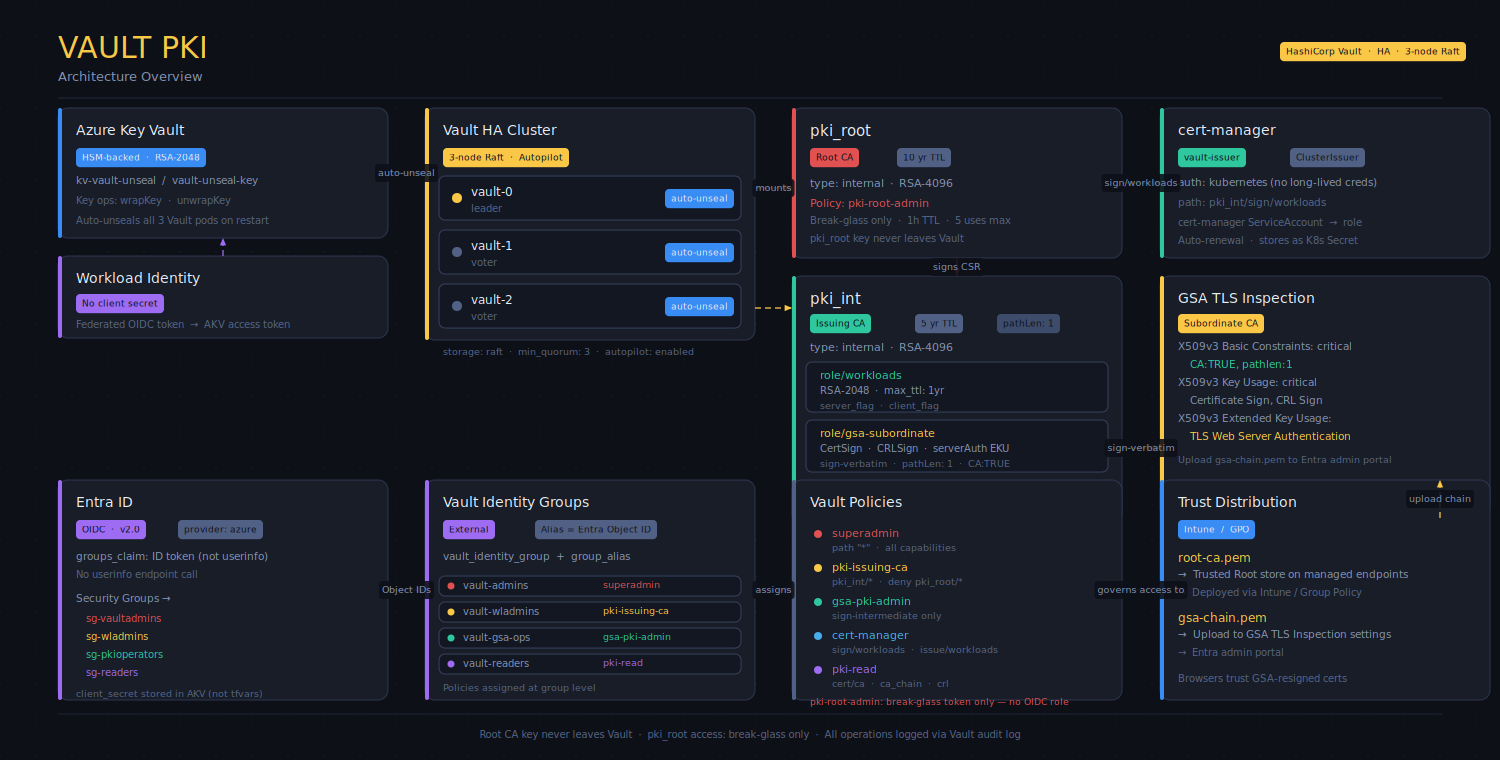
The two-tier CA hierarchy is important. The root CA private key never leaves Vault and is only accessible via a break-glass token. Day-to-day operations - signing workload certificates, signing the GSA CSR - go through the issuing CA. If the issuing CA is ever compromised, you revoke it and re-issue from the root without touching the root key.
Prerequisites
- AKS cluster with OIDC issuer and Workload Identity enabled
- cert-manager already running (we use it for Vault's own TLS certificate)
- ArgoCD for GitOps deployment
- Helm, Terraform, vault CLI, az CLI, kubectl, jq
Azure: Key Vault and Managed Identity
The first step is creating the Azure Key Vault and the (HSM-backed) key that Vault will use for auto-unseal. We also create a User-Assigned Managed Identity that the Vault pods will use to authenticate to Azure Key Vault via Workload Identity - no client secrets involved.
resource "azurerm_user_assigned_identity" "vault_unseal" {
  name                = "id-vault-unseal"
  resource_group_name = azurerm_resource_group.vault.name
  location            = azurerm_resource_group.vault.location
}

resource "azurerm_key_vault" "vault_unseal" {
  name                       = "kv-vault-unseal"
  resource_group_name        = azurerm_resource_group.vault.name
  location                   = azurerm_resource_group.vault.location
  sku_name                   = "standard"   # HSM-backed keys require premium
  enable_purge_protection    = true
  enable_rbac_authorization  = true
}

resource "azurerm_key_vault_key" "unseal" {
  name         = "vault-unseal-key"
  key_vault_id = azurerm_key_vault.vault_unseal.id
  key_type     = "RSA" # or RSA-HSM if you want to be really secure
  key_size     = 4096
  key_opts     = ["wrapKey", "unwrapKey"]

  rotation_policy {
    automatic {
      time_before_expiry = "P30D"
    }
    expire_after         = "P90D"
    notify_before_expiry = "P29D"
  }
}

resource "azurerm_role_assignment" "vault_unseal_crypto_user" {
  scope                = azurerm_key_vault.vault_unseal.id
  role_definition_name = "Key Vault Crypto User"
  principal_id         = azurerm_user_assigned_identity.vault_unseal.principal_id
}

resource "azurerm_federated_identity_credential" "vault_unseal" {
  name                = "vault-k8s-federated"
  resource_group_name = azurerm_resource_group.vault.name
  parent_id           = azurerm_user_assigned_identity.vault_unseal.id
  audience            = ["api://AzureADTokenExchange"]
  issuer              = var.aks_oidc_issuer_url # the oidc issuer url of your AKS cluster
  subject             = "system:serviceaccount:vault:vault"
}
The federated credential is what links the AKS service account to the managed identity. When the Vault pod starts, the Workload Identity webhook injects a signed OIDC token into the pod, which Azure exchanges for an access token for Key Vault. No secret, no rotation, no risk of credential leakage.
Deploying Vault on Kubernetes
Vault is deployed via Helm, managed by ArgoCD. The key configuration elements in values.yaml:
Auto-unseal via Azure Key Vault:
extraEnvs:
  AZURE_TENANT_ID=xxxxxx
  AZURE_CLIENT_ID=xxxxxx

seal "azurekeyvault" {
  vault_name = "kv-vault-unseal"
  key_name   = "vault-unseal-key"
}
With Workload Identity, AZURE_TENANT_ID, AZURE_CLIENT_ID, and AZURE_FEDERATED_TOKEN_FILE are all injected automatically by the webhook. Vault's Azure SDK picks them up without any additional configuration.
HA Raft with auto-pilot:
storage "raft" {
path    = "/vault/data"
node_id = "${HOSTNAME}"

retry_join {
leader_api_addr = "https://vault-0.vault-internal:8200"
...
}

autopilot {
cleanup_dead_servers      = "true"
min_quorum                = 3
server_stabilization_time = "10s"
}
}
Pod anti-affinity to spread the three nodes across different Kubernetes nodes - standard for any HA setup.
TLS via a cert-manager Certificate resource using a self-signed bootstrap issuer. After the PKI is operational, this gets switched to the Vault issuer.
Initialising the Cluster
With auto-unseal active, initialisation looks different from the classic Vault setup. There are no unseal keys - instead, Vault generates recovery keys that are only needed for disaster recovery scenarios.
kubectl exec -n vault vault-0 -- sh -c \
  "VAULT_CACERT=/vault/userconfig/vault-tls/ca.crt \
   vault operator init \
   -recovery-shares=5 \
   -recovery-threshold=3 \
   -format=json" > vault-recovery-keys.json
Store those recovery keys somewhere safe - not in git. After init, vault-0 unseals automatically via Azure Key Vault. Then join the other nodes:
kubectl exec -n vault vault-1 -- vault operator raft join \
  https://vault-0.vault-internal:8200

kubectl exec -n vault vault-2 -- vault operator raft join \
  https://vault-0.vault-internal:8200
Both nodes will also auto-unseal after joining.
PKI Bootstrap with Terraform
Rather than running shell scripts, the entire PKI setup is done in Terraform. Here is the resource chain:
# Root CA
resource "vault_mount" "pki_root" {
  path        = "pki_root"
  type        = "pki"
  max_lease_ttl_seconds = 315360000   # 10 years
}

resource "vault_pki_secret_backend_root_cert" "root" {
  backend     = vault_mount.pki_root.path
  type        = "internal"
  common_name = "Internal Root CA"
  issuer_name = "internal-root-ca"
  ttl         = "87600h"
  key_type    = "rsa"
  key_bits    = 4096
}

# Issuing CA
resource "vault_mount" "pki_int" {
  path        = "pki_int"
  type        = "pki"
  max_lease_ttl_seconds = 157680000   # 5 years
}

resource "vault_pki_secret_backend_intermediate_cert_request" "issuing" {
  backend     = vault_mount.pki_int.path
  type        = "internal"
  common_name = "Internal Issuing CA"
}

resource "vault_pki_secret_backend_root_sign_intermediate" "issuing" {
  backend         = vault_mount.pki_root.path
  csr             = vault_pki_secret_backend_intermediate_cert_request.issuing.csr
  issuer_ref      = vault_pki_secret_backend_root_cert.root.issuer_id
  ttl             = "43800h"
  max_path_length = 1
}

resource "vault_pki_secret_backend_intermediate_set_signed" "issuing" {
  backend     = vault_mount.pki_int.path
  certificate = join("\n", [
    vault_pki_secret_backend_root_sign_intermediate.issuing.certificate,
    vault_pki_secret_backend_root_sign_intermediate.issuing.issuing_ca,
  ])
}
The key thing here is type = "internal" on the root CA. Vault generates the key pair internally and it never leaves Vault. Combined with the policy setup that restricts pki_root/* access to a break-glass token only, the root CA key is as isolated as you can get in a software PKI.
Signing the GSA CSR - where this falls apart
Line the four requirements up against sign-intermediate, the endpoint you would obviously reach for:
| Requirement | sign-intermediate |
Notes |
|---|---|---|
basicConstraints=critical,CA:TRUE |
✅ automatic | Hardcoded for this endpoint |
pathLenConstraint=1 |
✅ via max_path_length=1 |
Explicit parameter |
keyCertSign, cRLSign |
✅ automatic | Hardcoded for this endpoint |
Server Auth EKU |
❌ no such parameter | And this one is not negotiable |
Three out of four is not a passing grade when the fourth is mandatory.
Extended Key Usage is normally an end-entity property - standard subordinate CA certificates do not carry
it - and Vault's PKI engine is built on that assumption. So the question becomes whether any other path
through Vault can produce a certificate that is both a CA and carries serverAuth.
I worked through all of them.
Every route, and where each one stops
| Approach | Result |
|---|---|
vault_pki_secret_backend_root_sign_intermediate with ext_key_usage |
The field does not exist on the resource |
vault_pki_secret_backend_intermediate_cert_request with ext_key_usage |
The field does not exist on the resource - it supports key_usage only, and has no issuer_name either |
vault_generic_endpoint → sign-intermediate, passing ext_key_usage as raw JSON |
Accepted by Terraform, then ignored by the Vault API |
vault_generic_endpoint → sign-verbatim |
Refuses a CSR with isCA=true |
Role endpoint sign/gsa-subordinate with ext_key_usage |
Sets the EKU, but will not set basicConstraints CA:TRUE |
Read that last pair together, because it is the whole story: the role endpoint gives you the EKU but not the CA bit, and the intermediate endpoints give you the CA bit but not the EKU. There is no endpoint that gives you both.
The CSR route closes off for the same reason. Even if you could get ext_key_usage into the request -
and the Terraform resource gives you no field for it - sign-intermediate would only carry CSR
extensions through with use_csr_values=true, and that endpoint will not take isCA=true from a CSR in
the first place.
This is not a provider gap
It is worth being precise about where the limitation actually lives, because "use the API directly
instead of Terraform" is the first thing anyone suggests. Dropping to vault_generic_endpoint - or to
curl - changes nothing. The sign-intermediate endpoint does not accept ext_key_usage as a
parameter at all. The gap is in Vault's server, and no amount of cleverness in the provider or the
request body works around a parameter the API does not implement.
Upload the chain without serverAuth and GSA rejects it, which is GSA behaving correctly: it published
the requirement and the certificate does not meet it.
So Vault was the wrong tool for this specific certificate. Everything else in this post works. This one thing does not, and it happened to be the reason I started.
What I used instead
Nathan McNulty has published a script that does exactly this job: Initialize-GSATLSInspection.ps1. It is worth reading even if you never run it, because it shows what the certificate has to look like when nothing is abstracting it away from you.
The approach is different in a way that matters. Rather than asking a PKI product to emit a profile it does not want to emit, it constructs the certificate directly with .NET's CertificateRequest and X509SignatureGenerator (PowerShell 7.4+), builds the DER by hand, and performs the signing through the Azure Key Vault REST API. The root lives in Key Vault as a non-exportable RSA-HSM 4096 key with a ten-year validity, so the private key never leaves the HSM - which gets you most of what the Vault root gave me, without the cluster.
The extensions it sets on the subordinate are the ones GSA actually wants:
basicConstraints:     critical, CA:TRUE, pathlen:1
keyUsage:             critical, digitalSignature, keyCertSign, cRLSign
extendedKeyUsage:     serverAuth (1.3.6.1.5.5.7.3.1)   <- non-critical
subjectKeyIdentifier: derived from the public key
authorityKeyIdentifier: references the issuer SKI
Note digitalSignature in the key usage - my original requirement block above left it out, copied from the documentation page, and it belongs there. The pathlen:1 is deliberate: it permits GSA to create the one issuing CA it needs beneath this root and prevents it going deeper.
When the abstraction will not produce the profile, drop to the layer that will. Building DER by hand feels like a step backwards until you notice it is the only approach that puts you in charge of every byte.
Update: Microsoft now issues the CA for you
Some time after I finished this, Microsoft added a managed certificate option for TLS inspection. It is in preview at the time of writing.
The short version: Microsoft generates a tenant-specific root CA, operates it, holds the private key in its own infrastructure and handles the whole certificate lifecycle including rotation. Default validity is ten years, configurable shorter via the API. Everything this post fought with - producing a certificate that is simultaneously a CA and carries Server Auth EKU, and finding a PKI willing to emit that profile - is gone, because you never produce a certificate at all.
What you still do yourself is the part that was never the hard bit: download the root CA from the TLS inspection settings, push it to your endpoints with Intune or whatever MDM you run, verify it landed in the Trusted Root store on a test device, then enable it and assign your inspection policies. Rotation is the same loop: create the new certificate, deploy the new root, enable it, validate, delete the old one.
You need an Entra Internet Access licence (trial or full) and the Global Secure Access Administrator role.
So was any of this wasted?
For the GSA use case specifically, if you are starting now: use the managed certificate. It is less work, there is no key for you to lose, and the rotation story is better than anything you will hand-roll.
There are still cases where you would not:
- It is in preview. Plenty of the organisations I work with cannot put a preview feature on the path of all outbound TLS, and that alone settles it until it goes GA.
- Key custody. The private key of a CA that can mint a certificate for any site your staff visit now lives with Microsoft rather than with you. That is a reasonable trade for most, and a conversation with your risk function for some, particularly where a control explicitly requires the organisation to operate its own CA.
- You needed a private CA anyway. If workload certificates inside your clusters were already on the roadmap, the Vault build stands on its own merits and GSA was only the thing that prompted it.
That last one is where I landed, and it is covered at the end.
Entra ID OIDC Authentication
With the PKI working, the next step is replacing static Vault tokens with proper Entra ID authentication. The setup uses OIDC with the provider = "azure" config, which tells Vault to read groups directly from the ID token rather than calling the userinfo endpoint. This matters because Microsoft Graph's userinfo endpoint is not reliably reachable from within a Kubernetes cluster, and the groups claim is in the ID token anyway.
resource "vault_jwt_auth_backend" "oidc" {
  type               = "oidc"
  path               = "oidc"
  oidc_discovery_url = "https://login.microsoftonline.com/${var.tenant_id}/v2.0"
  oidc_client_id     = azurerm_user_assigned_identity.vault_oidc.client_id
  oidc_client_secret = data.azurerm_key_vault_secret.vault_oidc_secret.value
  default_role       = "reader"

  provider_config = {
    provider = "azure"
  }
}
Note that even though we use a managed identity as the OIDC client, Vault's OIDC auth backend still requires a client_secret. The managed identity handles the unseal path - for the OIDC login flow, a client secret is unavoidable. We store it in Azure Key Vault and pull it via Terraform, so it never lives in tfvars or state in plaintext.
Group membership is enforced through Vault external groups, not through bound_claims on the role. The external group aliases map Entra group Object IDs to Vault groups, and policies are attached to the groups. Adding a new group is a one-liner in the Terraform locals:
locals {
  vault_groups = {
    "msam-role-sg-vaultadmins"   = vault_policy.superadmin.name
    "msam-role-sg-wladmins"      = vault_policy.pki_issuing_ca.name
    "msam-role-sg-pkioperators"  = vault_policy.gsa_pki_admin.name
    "msam-role-sg-readers"       = vault_policy.pki_read.name
  }
}
The for_each on the group resources picks this up automatically.
Getting Rid of the Root Token
Once OIDC is working and you have verified that your admin group can do everything it needs to, revoke the root token:
vault token revoke "${VAULT_TOKEN}"A superadmin policy with capabilities = ["create", "read", "update", "delete", "list", "sudo", "patch"] on path "*" covers almost everything the root token can do. The exceptions are a handful of system-level operations like vault operator seal - for those, generate a new root token from recovery keys when needed. That process requires a quorum of recovery key holders, which is exactly the right amount of friction for that level of access.
The root CA mount is isolated separately. The pki-root-admin policy is never assigned to any OIDC role. The only way to touch the root CA is a break-glass token with a short TTL and use limit, generated manually by someone with appropriate access. All access is logged via Vault's audit log.
cert-manager Integration
cert-manager connects to Vault via the vault-issuer ClusterIssuer, using Kubernetes auth so there are no long-lived credentials:
apiVersion: cert-manager.io/v1
kind: ClusterIssuer
metadata:
  name: vault-issuer
spec:
  vault:
    server: https://vault.vault.svc.cluster.local:8200
    path: pki_int/sign/workloads
    caBundle: <base64-root-ca>
    auth:
      kubernetes:
        role: cert-manager
        mountPath: /v1/auth/kubernetes
        serviceAccountRef:
          name: cert-manager
The cert-manager policy only grants access to pki_int/sign/workloads and pki_int/issue/workloads. It cannot touch the root CA, cannot sign intermediate certificates, and cannot access any other secrets engine. Minimum viable permissions.
Lessons Learned
A few things that cost me time that might save you some:
Vault cannot issue a CA certificate carrying an EKU. The role endpoint sets ext_key_usage but not
basicConstraints CA:TRUE; sign-intermediate sets the CA bit but has no ext_key_usage parameter;
sign-verbatim refuses an isCA=true CSR outright. Check that your chosen PKI can emit the exact
certificate profile you need before you build a cluster around it. Ten minutes reading endpoint
parameters at the start would have saved me the whole detour.
"Just call the API directly" is not always an escape hatch. My instinct when the Terraform resource
lacked a field was to drop to vault_generic_endpoint and pass the parameter as raw JSON. Terraform
accepted it and Vault ignored it. When a field is missing from a well-maintained provider, consider that
it may be missing because the API has nothing to bind it to.
Verify the requirement list against a working implementation, not just the documentation. The Microsoft docs page I worked from omits digitalSignature from the key usage. A script that had actually been run in anger had it.
The userinfo endpoint. If you get error reading /userinfo endpoint: EOF in Vault logs, add provider_config = { provider = "azure" } to your OIDC backend config. This tells Vault to read claims from the ID token directly and skip the userinfo call entirely. The groups claim is in the ID token anyway.
External groups are not optional. OIDC auth in Vault does not automatically map group memberships to policies. You need vault_identity_group resources of type external, with vault_identity_group_alias resources mapping the Entra group Object IDs to those groups. Without this, users authenticate successfully but get no policies.
The Raft bootstrap sequence matters. Only initialise vault-0. The other nodes join after init. If you try to initialise before vault-0 is unsealed, the other nodes will loop on failed to get raft challenge. Let vault-0 unseal via Azure Key Vault first, then join the others.
Application Gateway health probes. If you are fronting Vault with an Azure Application Gateway, the health probe needs to hit /v1/sys/health and accept status codes 200-399,429. The default 200-399 range will mark standby nodes as unhealthy. Also make sure the backend hostname override matches a SAN in Vault's TLS certificate, and upload the Vault CA certificate to App Gateway as a trusted root.
Vault's OIDC backend requires a client secret. Even with a managed identity as the OIDC client identity, Vault's OIDC auth backend requires oidc_client_secret to be set. The Azure vault_auth_backend type is for VM/workload MSI auth, not for human interactive login. Keep OIDC for humans, Kubernetes auth for workloads.
Where this ended up
I tore the cluster down. It was built for one certificate it could not produce, nothing else in that environment needed a private CA at the time, and an HA Vault cluster is not something you leave running to admire. The GSA certificate came from Key Vault via the script above and TLS inspection has been running on it since.
I do not regard the build as wasted. The two-tier hierarchy, the Key Vault auto-unseal, the OIDC group mapping and the cert-manager integration all worked exactly as designed, and the Terraform for all of it is reusable the next time a client genuinely needs a private CA - which, in a regulated estate issuing its own workload certificates, happens more often than you would think. What I would not do again is pick the PKI first and check the certificate profile second.
If you are here because you are about to try the same thing, the order is now: use the managed certificate if preview is acceptable to you, fall back to Key Vault and the script if it is not, and do not reach for Vault for this particular certificate at all. What changed is not that the Vault build was wrong. It is that GSA is no longer a reason to do it.
The Terraform, Helm values and ArgoCD manifests behind this live in a private client repository, so there is no link to give you - everything load-bearing is inlined above. If you are putting something similar together and want to talk through the shape of it, get in touch.
Until the next one!